Best Healthcare Website Design: 5 Examples for Inspiration
The design of your practice website shapes first impressions. A modern, professional design makes it easier for prospective patients to learn about your medical services and book appointments with you. It also improves online visibility and credibility, helping you to attract new patients and reinforce the quality of your care.
So what makes for a well-designed medical website? In this article, we help you answer this question by exploring five of the best healthcare website design examples we’ve seen. We call out what they are doing well so that you can apply these best practices to your own website.
Why Healthcare Web Design Matters
Your practice’s website is where potential patients go to learn about who you are and what you do. An intuitive, professional design makes it easy for website visitors to find this information, which is the first step in them choosing you as their healthcare provider. Here are some additional reasons why the design of your website is important.
Enhancing User Experience
User experience describes what it’s like for patients to interact with your website. Factors like page organization and load speed can affect ease of navigation. This is important because the easier you make it for patients to find the information they’re looking for, the more likely they are to stay on your website and learn about your treatment options.
Building Trust and Credibility
First impressions matter, and a clean website can convey a sense of professionalism and care to potential patients. Add in additional features, such as patient testimonials, educational articles, and service descriptions, and you can convince them that you’re a credible medical professional they can trust to help with their health concerns.
Increasing Appointment Bookings
Once website visitors learn about your background and services and feel confident in your expertise, they may be ready to take the next step in becoming a patient. Adding buttons throughout your website and having a dedicated contact page with a form and/or phone number can make it easy for them to schedule an appointment with you.
Improving Search Visibility
Search engines like Google heavily consider user experience and credibility when they’re determining search rankings. They are more likely to show your website in search results if your pages demonstrate your medical expertise and are easy to navigate. This helps you reach new patients because it puts you in front of more people who are searching for medical care in your area.
Key Elements of Effective Healthcare Website Design
From navigation to imagery, there are several elements that go into designing a functional website. We explore these design elements below and touch on a few features that are specific to the healthcare industry, such as online scheduling and Health Insurance Portability and Accountability Act (HIPAA) compliance.
Intuitive Navigation
Website visitors should be able to find the information they need quickly and easily. One way to ensure this is to include a navigation bar along the top of your website that links to your core pages. For a healthcare website, you might have a navigation bar organized in the following way:
- Services: Create a page for each medical service you offer.
- About Us: Build a “Meet the Team” page with a photo of each team member and a brief description of their role, background, and education. You can also create another page under this tab that loads testimonials and reviews from past patients so that prospective patients can see proof of your medical care.
- Patient Resources: Put blog content, video content, and any other educational resources you have for patients under this tab.
- Contact Us: Insert a form on this page that visitors can fill out to schedule a medical appointment with you. Every page on your website should have a “Contact Us” button that directs visitors to this page.
Mobile Responsiveness
Many patients conduct research and view websites on their mobile devices. This makes it crucial for your practice website to be both mobile- and desktop-friendly. A responsive design automatically adjusts to the screen size the visitor is using to give them an optimal viewing experience. For example, images on your website may get smaller when someone is using their smartphone as opposed to their laptop.
Patient Testimonials
Featuring testimonials on your website can provide social proof, reassuring potential patients about the quality of your care. The best way to utilize testimonials is with a dedicated page. However, you can also include a section or carousel on your homepage that highlights a few of the most notable ones so that visitors see them right away.
Clear CTAs
Calls to action (CTAs) guide website visitors to take a certain action. In the case of a medical website, you want visitors to contact you to book an appointment. Place CTA buttons on every page of your website to guide visitors to your “Contact Us” page, where they either call a number or fill out a form. The button should stand out (e.g., large text size, bright color) so that visitors see it and know what you’re asking them to do.
High-Quality Imagery
Good web design balances text with imagery to avoid overwhelming visitors with too many words to read. Incorporate imagery into every page on your website. Stay away from generic stock photos, and opt for real, professional images of your team members, exam rooms, and reception area.
Fast Load Time
Page speed is critical for the user experience and search visibility of a website. You want each page on your website to load in under three seconds so that visitors don’t get frustrated and leave your website without exploring it. Numerous factors go into determining load time, but some examples include the size of your images and the number of plugins you add.
Robust Accessibility Features
Accessibility is important for all websites, but it’s especially important for medical practices that might be treating patients with disabilities. Write descriptions (i.e., alt texts) for images, turn on captions for videos, and take other steps to follow the Web Content Accessibility Guidelines (WCAG). WCAG — along with federal, state, and local laws — ensure internet users with visual, motor, auditory, and cognitive disabilities have equal access to the relevant information on your website.
HIPAA-Compliant Encryption
The beginning of every website URL has either “http” or “https.” The letter “s” stands for “secure,” which means the website data is encrypted. All medical websites should be encrypted because healthcare professionals have an obligation to follow HIPAA guidelines and protect patient data that might pass through their websites. Encryption is more common than not nowadays, so it’s something you can easily get through your website hosting provider.
View Website Design Options
5 Examples of Well-Designed Medical Websites
Looking at examples of healthcare website designs can help you get inspiration for your own practice website. To save you from blindly searching for great examples, we pulled a list of five medical websites our team at Officite designed. Keep reading to explore their most notable features.
PediatriCare Associates
Feature of Note: Homepage Movement
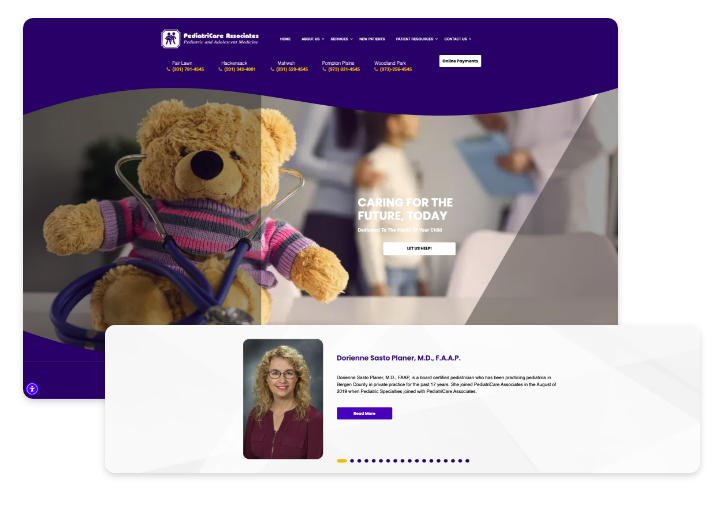
The homepage for PediatriCare Associates uses movement to catch the visitor’s attention. The header contains a carousel of images — all related to children, the practice’s specialty — through which it automatically cycles. Another carousel is used farther down the page to briefly describe the providers at the practice. There are additional homepage elements that move, such as the CTA buttons turning a different color when you hover over them, but the two carousels move on their own, which draws the visitor in without them doing anything.
Levy Dermatology
Feature of Note: Service Pages
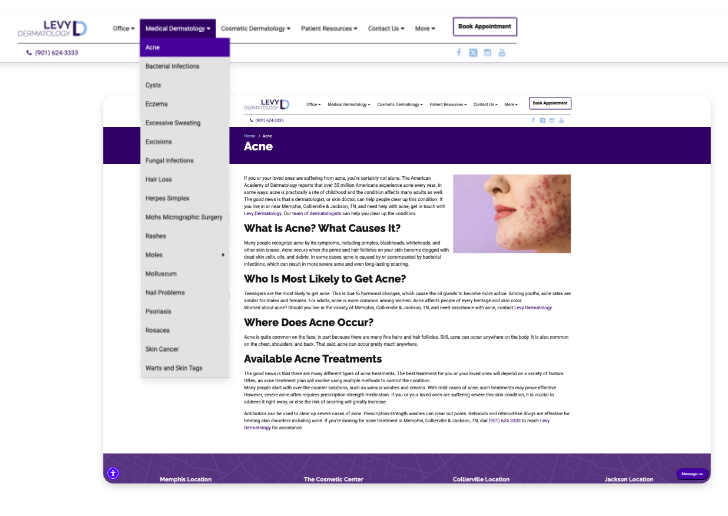
Levy Dermatology has a dedicated page for each skin condition it treats and dermatology service it offers. It categorizes these pages as medical vs. cosmetic dermatology and makes them accessible through drop-down menus on the navigation bar. Having this level of detail on the website is helpful for both potential patients and search engines. Patients can determine if the practice can help them with their medical concern, and Google can see that the practice is a trustworthy, experienced healthcare provider.
Vascular & Interventional Specialists
Feature of Note: Patient Testimonials
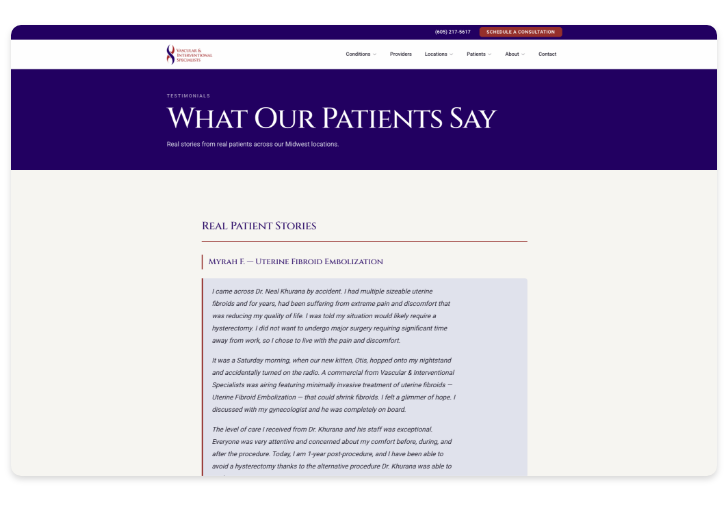
The website for Vascular & Interventional Specialists has a page that displays patient testimonials. This page includes several interactive features, allowing website visitors to separate the reviews by platform (Google or Facebook), click on each review for more information, and even leave a review of their own. There’s also a section on the homepage that directs visitors to the dedicated page to ensure they see this positive feedback about their patient experience. All of these elements combined show that the practice understands the importance of real examples from patients in convincing website visitors to book appointments.
South Jersey Foot and Ankle Specialists
Feature of Note: Patient Resources
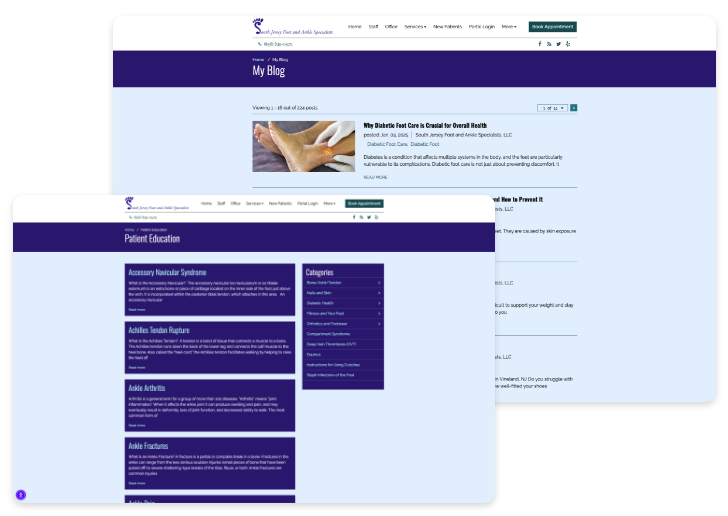
South Jersey Foot and Ankle Specialists has an extensive library of educational resources for patients. The resources live in two places on the website — under patient education and blog. Both of these sections contain articles that explain common conditions and treatments in the podiatry field. Similar to the service pages for Levy Dermatology, these resources educate patients on foot and ankle care while also establishing the practice’s credibility in the eyes of Google.
SoHo Ambulatory Surgical Center
Feature of Note: Provider Pages
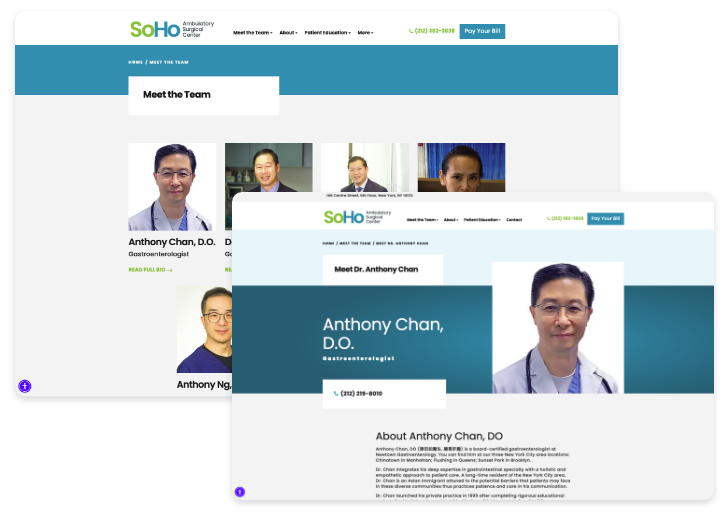
SoHo Ambulatory Surgical Center has a main “Meet the Team” page that lists the physicians at the practice. It links out to specific pages for each provider with more information on their medical expertise and educational background. Located in Chinatown in New York City, the practice shows a deep understanding of its target audience by including Chinese spellings for each doctor’s name and specialty.
Final Thoughts
Your website’s design is essential for patient acquisition and retention. By enhancing user experience, building trust, increasing appointment bookings, and improving search visibility, a well-designed website can significantly benefit your medical practice. We hope the examples we explored in this article inspire you to evaluate your own website and implement design best practices.
At Officite, we specialize in website designs and marketing solutions for healthcare professionals. Whether you need a completely new website or specific enhancements to your existing one, Officite can help you achieve your goals and grow your online presence.

Katie McNichols is an experienced writer and editor, specializing in digital content. The aim of her blog posts is to demystify digital marketing for healthcare professionals. She hopes to equip them with the tools they need to build an online presence that promotes their services and grows their practice.